Guide
How do you move your comic from Immersive Translate to Bublate?
Keep using Immersive Translate for reading. Move only the comics you own or have the rights to. Save the source pages and copy your custom glossary term pairs. Then make a series in Bublate, paste the pairs into the series bible Import and upload the chapter. Bublate letters it, redraws sound effects and gives you an editor before you export.
Table of contents
Immersive Translate is one extension and one subscription for web pages, PDFs, subtitles and comics. Some creators and teams also run their own pages through its image or manga feature for a quick draft. This guide is for them: the series is yours, or you have the rights, and you now need pages to publish. Everything below about Immersive Translate comes from its own site and docs, read on 21 November 2026. For the full picture of the product, read the Immersive Translate review.
Why move your own comic off Immersive Translate?
- It is built to read. Its manga page shows three steps: install the extension, open a manga site, click translate. Its docs list the supported sites, such as Pixiv, MANGA Plus and MangaDex.
- Manga is a paid, beta feature. The docs call it "Manga Translation (Beta)" and say it "is only available for Pro members." The manga page FAQ says the same: "Manga translation is a Premium feature."
- Free image text recognition is narrow. On the free version, the docs say recognition runs in the browser, only in Chrome and Edge, and "is limited to English and some Latin-based languages."
- No page editor. Its comic pages describe erasing the dialogue and placing the translation in the bubble. They show no tool to change a line, move text or pick a lettering font.
- No series memory for comics. Custom glossaries exist for its text features. The comic pages do not say they apply to comic pages or carry from chapter to chapter.
- Monthly quota with no rollover. Its quota page says benefits "refresh monthly, and unused benefits do not roll over across months," on annual plans too.
Its manga page also says Japanese sound effects are "accurately converted to natural expressions," with ドカン to BOOM as an example. We did not test this. Bublate erases each sound effect from the art and draws the word in the target language. Or it keeps the art and adds a small caption.
What carries over, and what does not?
| Item | From Immersive Translate | In Bublate |
|---|---|---|
| Source pages | You need the original files. The extension translates images on a web page, so it may never have held a file | Upload images (PNG, JPG, WebP), a folder, ZIP, CBZ or PDF |
| Custom glossary | Term pairs you made for its text features | Copy the pairs and paste them into the series bible Import. Set each term to Always or Prefer |
| Translated images | Flat images with the text drawn in | Do not upload them. Bublate starts from the source pages |
| Engine and prompt settings | Engine choice and custom prompts | Nothing to move. Bublate picks its models. A chapter note (up to 1,000 characters) passes your instructions to each step |
| Fonts | None to pick on the comic pages | Comic fonts in the editor, and your own licensed fonts under Your fonts |
| Subscription | Billed by Immersive Translate, Apple or Google | Credits, a monthly plan or packs. Nothing carries over |
Its docs describe glossary pairs in its settings, and we found no page that describes a glossary export. So copy the pairs by hand. A plain list works, one pair per line, for example "Seo-yeon = Seoyeon, always". Bublate reads the list and fills the fields. Bublate saves nothing until you click Save.
A translation of someone else's comic is not yours to publish, on any tool. Bublate takes only pages you own or have the rights to translate. See upload rights.
How do you move a series, step by step?
- Collect the source pages for each chapter in one folder, ZIP, CBZ or PDF. Bublate takes up to 30 MB a page and 1000 pages a chapter.
- Copy your glossary out of Immersive Translate into a text file, one term per line. Add the character names, forms of address and style rules you already use.
- Sign up. A new account gets 30 free credits, with no card.
- Make the series. In the library, click New series and set the title, source language and format.
- Import the glossary. In the Series bible window, click Import, paste the file, check the fields and click Save. The series bible template shows every field.
- Upload chapter 1. Pick the target language, add a chapter note if the chapter needs one, and read the price before you start.
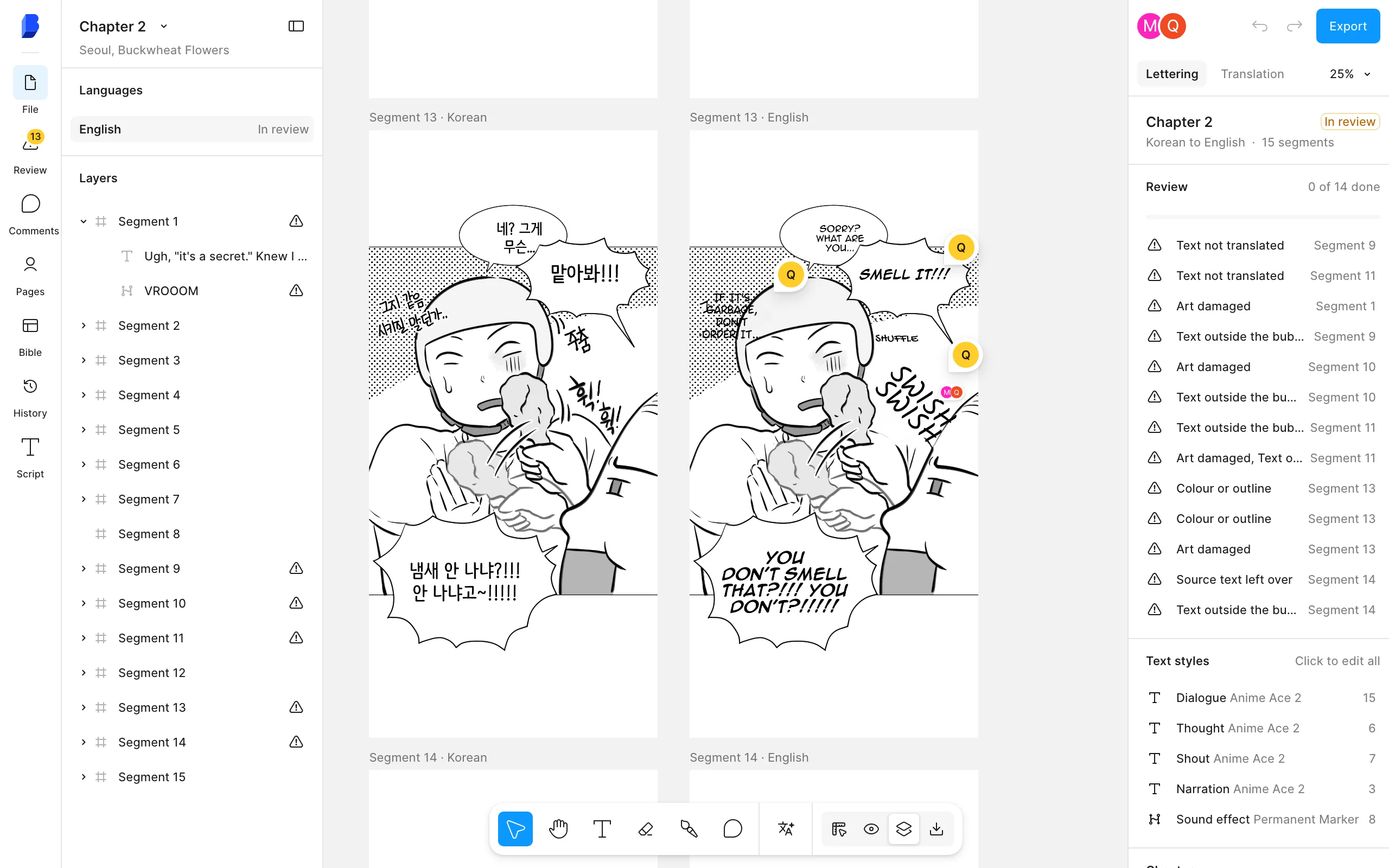
- Check it in the editor. Fix lines and sound effects, then mark the chapter done. Lines your team corrects go into the translation memory for later chapters.
- Export with your platform preset, or as a layered PSD per page. See export sizes and PSD.
- Upload the other chapters with Upload many chapters, up to 300 a batch.
What does each one cost?
Immersive Translate sells a subscription that covers all its features. The pricing page shows prices in your local currency, so the US dollar prices below come from the US App Store listing. Its manga page shows other plan cards, with Pro at $9.99 a month or $119.88 a year and Max at $19.99 a month. Check the price at checkout. The plan table on the pricing page did not load in our fetch, so we give no monthly image limit.
| Plan | Price (US) | Comics |
|---|---|---|
| Immersive Translate Free | $0 | Web page translation with daily limits. Manga translation is not included |
| Immersive Translate Pro | $9.99 a month or $79.99 a year (App Store) | Manga translation (beta) on supported sites, server-side image text recognition |
| Immersive Translate Max | $34.99 a month or $289.99 a year (App Store) | All Pro features, higher model limits |
| Bublate, new account | $0 | 30 free credits, once |
| Bublate, by the chapter | $3 a webtoon chapter of up to 20 segments, up to $0.60 a manga page | Cleaned and lettered, sound effects redrawn, editor and exports |
| Bublate, monthly plans | Creator $19 (100 credits), Studio $69 (500), Publisher $229 (2,000) | Plan credits reset each month |
| Bublate, credit pack | $149 for 1,000 credits | Bought credits for chapters at any time |
If you read comics and web pages every day, Immersive Translate costs less per page. If you publish a few chapters a month in one or two languages, Bublate charges only for those chapters. Full rules on pricing.
How do you stop paying for Immersive Translate?
You may not want to stop: it still translates the web pages and PDFs you read. If you do, the pricing FAQ says to click Billing on your profile page, then Cancel Plan. Cancel an App Store plan in your Apple Account subscriptions. The FAQ allows a refund request within 24 hours of a monthly purchase and 72 hours of a yearly one. It also requires that you have not used the service much.
What does Bublate not do?
- No browser extension and no phone app. It does not translate web pages, PDFs, video or comics on reading sites.
- No translation of pages you do not have the rights to.
- No engine choice. Bublate picks the models for each step.
- No final check. A person who reads both languages still checks every chapter before release.
To compare the two in one table, read Bublate vs Immersive Translate. For other tools, see Immersive Translate alternatives, or the guides for moving from Ichigo Reader and moving from mangatranslate.com.
Frequently asked questions
Can I move my Immersive Translate glossary to Bublate?
Yes, by copy and paste. Immersive Translate keeps custom glossaries as term pairs in its settings, and we found no glossary export in its docs. Paste the pairs as a list into Import in the Bublate series bible. Bublate fills the glossary, you set each term to Always or Prefer, and you click Save.
Is Immersive Translate manga translation free?
Not by its docs. They say manga translation is in beta and only for Pro members, and its manga page calls it a Premium feature. Its image page says the image feature is free to use. Free image text recognition runs only in Chrome and Edge, for English and some Latin-based languages.
Does Bublate translate web pages and PDFs like Immersive Translate?
No. Bublate translates comic pages only: webtoon and manhwa strips, manga, manhua and other print pages that you upload and have the rights to. For web pages, PDFs and subtitles, keep Immersive Translate or another reader tool.
What does Bublate cost compared with Immersive Translate Pro?
Immersive Translate Pro is $9.99 a month on the US App Store and covers all its features. Bublate is $3 a webtoon chapter of up to 20 segments and up to $0.60 a manga page. That is for each target language, after 30 free credits. Monthly plans start at $19 for 100 credits.
Can I upload WEBP pages to Bublate?
Yes. Bublate takes PNG, JPG and WebP pages, a folder of pages, ZIP, CBZ and PDF. The limits are 30 MB a page and 1000 pages a chapter. Save other image types, such as GIF, TIFF or HEIC, as PNG or JPG first.
Sources
- Immersive Translate, manga translation page (plans, supported sites, FAQ) · checked
- Immersive Translate, manga translator image page · checked
- Immersive Translate, pricing page FAQ · checked
- Immersive Translate docs, Manga Translation (Beta) · checked
- Immersive Translate docs, Image Translation (Beta) · checked
- Immersive Translate docs, Subscription Quota · checked
- Immersive Translate docs, Advanced Customization (custom glossaries) · checked
- App Store (US), Immersive Translate, in-app purchases · checked