Translating
How do I keep names and terms the same in every chapter?
Use the series bible. Bublate builds it from the first chapter of a series: characters and how they speak, names, forms of address, a glossary, style rules and the setting. Each later chapter in the same language starts from it. Edit it in the editor under the Bible tab. Entries you write or delete stay that way in later chapters.
What is in the series bible?
| Section | What it holds |
|---|---|
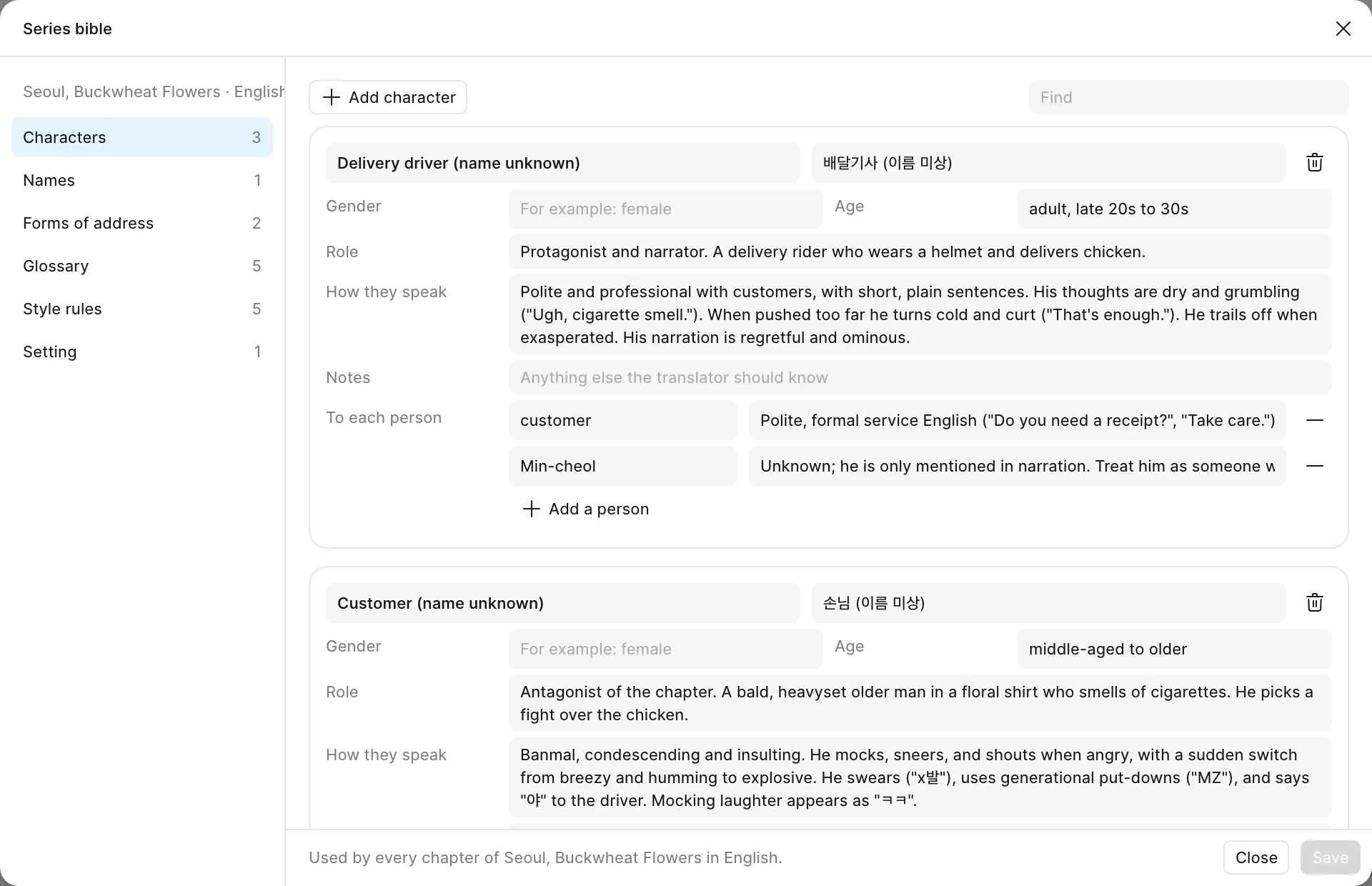
| Characters | Who they are in the story, gender, age, how they speak (register, tics, slang), notes, and how they talk to each other person |
| Names | Every person named in the chapters, with the spelling to use |
| Forms of address | How each character calls each other one: who, to whom, and the form |
| Glossary | Names of places, ranks, skills and other terms, with the words to use, set to Always or Prefer |
| Style rules | Rules for the whole series, for example: keep honorifics, no swearing |
| Setting | Genre, era, place and tone, in a few sentences |
How do I edit the series bible?
- Open a chapter of the series in the editor.
- Click Bible in the bar on the left. The tab lists the names and terms, and how many lines of this chapter use each one. Click one to list its lines and jump to them.
- Click the gear (Edit the series bible). The Series bible dialog opens.
- Pick a section on the left, for example Forms of address. Use Find to search the list. Add a row with Add character, Add name, Add form of address, Add term or Add rule.
- Click Save.
- Bublate shows how many lines in this chapter use what you changed. Click Translate these 5 again (with your number) to update them, or Not now to keep them as they are.
The lines translated again can be undone with Cmd+Z (Ctrl+Z on Windows). The next chapter you start in this language reads the saved bible.
How does the bible carry from chapter to chapter?
Chapter 1 builds the bible. When a chapter is done, its new names and terms are added to the series bible, and the next chapter starts from it. Entries a person wrote are kept, and entries a person deleted stay deleted, so a later chapter does not undo your work. In a batch upload of a new series, the first chapter goes first and the others wait for its bible, so all of them use the same names. More on the reasons in inside the series bible and consistent character voice.
The series bible fixes terms. For the choices behind them, read Japanese honorifics and Korean honorifics. Lines your team changed by hand are kept in a separate list, the translation memory, under Settings then Translation memory.
Frequently asked questions
Is there one series bible for all languages?
No. Each series has one bible for each target language. The English bible and the Spanish bible are separate, because names, honorifics and forms of address can be different in each language. A change to one does not change the other.
What is the difference between Always and Prefer in the glossary?
Always means the same words every time. Prefer means those words unless the line needs another form. Both are rules in every step that reads the bible: the translation, the edit pass and Translate again.
Can I start a chapter without the series bible?
Yes. When the series has a bible for a language, the start step shows Start from the series bible, on by default. Turn it off and the chapter builds its own bible. That bible is added to the series bible when the chapter is done.
What if two people edit the bible at the same time?
The first save wins. The second person sees "Someone else changed the bible since you opened it." Close the bible, open it again to see the other changes, and make your edit again.
Who can edit the series bible?
The owner, translators and letterers of the workspace. A reviewer can read the Bible tab but cannot edit it. In a team, every member works from the same series bible.