Guide
What should you check before you publish a translated webtoon?
Check five things before a translated episode goes live: you hold the rights for that language, the platform accepts the upload, the files meet its size and format limits, a native reader has compared the text with the source, and the credits name everyone who worked on it. The checklist below turns each one into a box with a reason.
Table of contents
Use this list once per episode and once per language. Each item is one check and one reason. The platform limits come from each platform's own help page, checked 20 November 2026. The full specs and their quotes are in Webtoon Sizes and File Specs and machine translation rules by platform. This page only turns them into checks.
Rights and platform rules
- You own the series, or you have written permission for this language. A translation is a derivative work, and only the copyright owner can allow one. Work through the rights checklist first.
- Your platform contract allows a second language. An exclusive deal can cover translations too. Read the contract, not the platform's general terms.
- The platform takes uploads you own. WEBTOON's CANVAS Content Guidelines (updated 25 November 2025) say you "must own all of the copyrights" to your uploads, or hold sufficient rights. LINE Manga Indies bans work that infringes another person's copyright.
- The platform's rule on machine translation is clear to you. WEBTOON runs its own opt-in program. Tapas bans generated content and does not say whether a machine-assisted translation counts. See platform rules.
- Your CANVAS Translation Program glossary is up to date, if the series is in the program. WEBTOON's Global CANVAS Creator FAQ says glossary changes apply only to episodes published after the change, and "Preview is not available at this time."
- You have a home after Tapas. Tapas ends service on 31 March 2027 at 23:59 PT. Creators can still publish until then. See Tapas Is Closing.
Files, sizes and formats
The limits below decide how you export. A file over a limit fails, or the platform shrinks it for you, and shrinking softens small lettering.
| Platform | Check before upload | Source, checked 20 Nov 2026 |
|---|---|---|
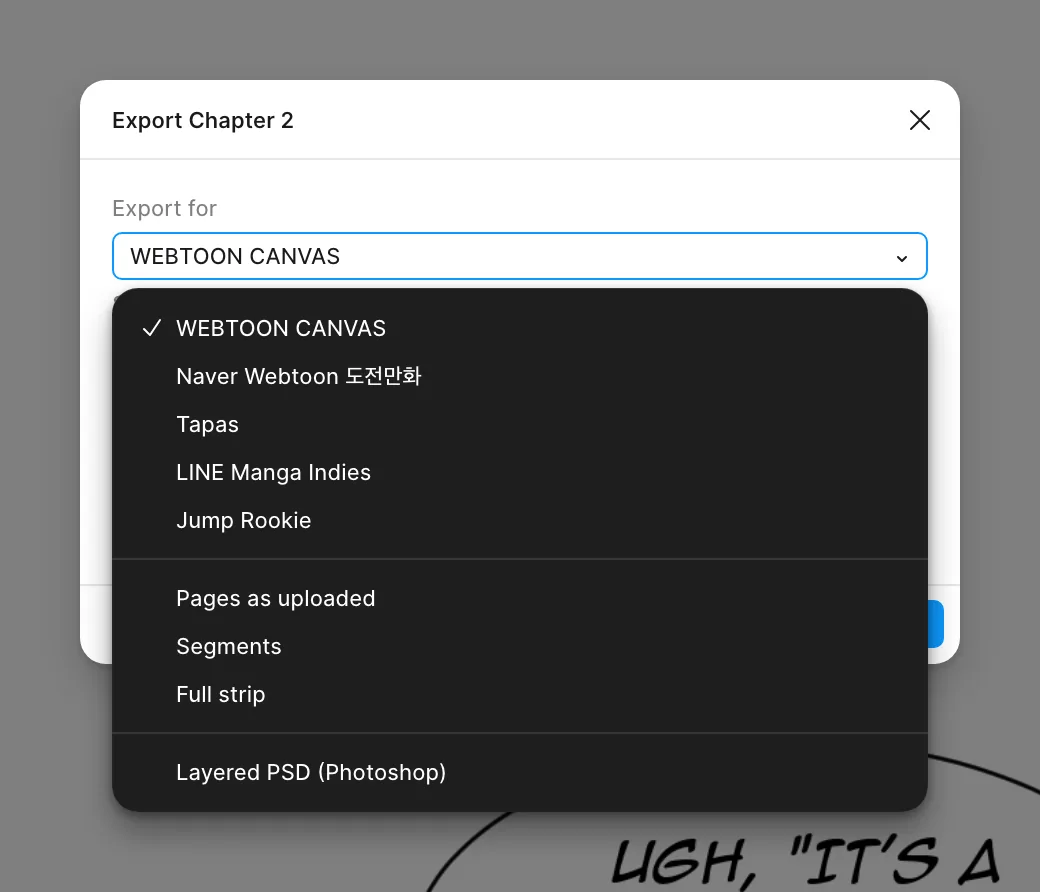
| WEBTOON CANVAS | Each image under 800 px wide and 1280 px tall, at most 2 MB. Up to 20 MB and 100 images. JPG, JPEG or PNG. | Creators Resource Handbook, section 6 |
| Naver 도전만화 | Exactly 690 px wide, any height. 5 MB a file, 50 MB in total. JPG or GIF only. Upload from a PC. | Naver Help, 도전만화 등록 방법 |
| Tapas | 940 px wide, no height limit, 10 MB. PNG, JPG or GIF (a GIF at most 1000 px tall). | Tapas creator guide |
| LINE Manga Indies | 800 px wide recommended. Each image 400 to 10000 px wide and 600 to 10000 px tall, 2 MB, up to 1000 images. PNG or JPG. | Posting guideline (archived copy, June 2026) |
| Jump Rookie | 800 px wide recommended. Up to 200 images an episode and 200 MB an upload. JPEG or PNG. Above 1200 x 20000 px, images are resized. | Jump Rookie help |
- Every image is inside the limits above. On WEBTOON, an image over 800 x 1280 px is sliced and reduced by the system.
- Slices fall in the gutters, never through a balloon. A cut line through text shows as a seam on some phones.
- The translated episode has the same slice points as the original. Readers who switch languages then see the same panels on each screen.
- The file format is one the platform takes. Naver 도전만화 takes no PNG. Export JPG copies from a PNG master.
- File names use English letters and numbers. The WEBTOON handbook asks for this on thumbnail files.
- You keep a full-size master of the translated episode. You need it for the next platform and for corrections.
Text and lettering
Run the lettering QA checklist on every page. The short version for publishing:
- A native reader has read the whole episode against the source. Machine output misses jokes, register and who speaks to whom.
- Names, places and forms of address match the [series bible](/glossary/series-bible). Readers notice a name that changes between episodes.
- No source text is left in a balloon, a caption or a sign that needs translation. Check side text and small print, not only the balloons.
- Sound effects are translated, kept with a caption, or left on purpose. Pick one rule for the series. See sound effect translation.
- Text is readable on a phone at the platform's width. The WEBTOON handbook says most creators use 12 to 30 px for standard text. A 12 px line at 800 px wide is about 10 px at Naver's 690 px.
- The font licence covers this use. Check commercial use and flattened images. See font licence.
Episode page, thumbnails and metadata
- The series title and summary are in the target language. A reader decides from these before the first panel.
- The title fits the field. LINE Manga Indies takes a work title of 1 to 30 characters and an introduction of up to 100.
- WEBTOON series thumbnails are the right size. Square 1080 x 1080 px under 500 KB, vertical 1080 x 1920 px under 700 KB, and no text on them.
- The Tapas episode thumbnail is 300 x 300 px, under 2 MB, and safe for all ages. The creator guide says it should not contain nudity or suggestive art.
- The content rating matches the episode. WEBTOON asks for a Mature rating for sexual themes or excessive blood or gore.
- The language is tagged where the platform asks for it, so readers of that language find the series.
Credits
- The credits name the original creator first. The translation is their work in another language.
- The translator, letterer and checker are named as each agreed. Some want a pen name or no credit.
- Required licence credits are there. A CC BY work needs credit, a link to the licence and a note that you changed it. Read each font licence for a credit rule too.
- The rights holder's copyright notice and watermark stay, unless the rights holder agrees in writing that they can go.
After you publish
- Open the live episode on a phone and scroll it once. Check the order, the slices and the text size.
- Read the first comments for names and terms that confused readers. Fix the bible, then the next episode.
- Log what you published, where and when. You need the date if a rights question comes up later.
Where Bublate fits in this list
Bublate does the first pass of the text work: it translates the episode, cleans the source text out of the art, letters every balloon, redraws sound effects and keeps names in a series bible. Its export cuts the strip in the gutters for the five platforms in the table. The rights, the native read, the metadata and the credits stay with you. Before each chapter starts, you confirm that you own the work or have the rights to translate it, as the upload rights page explains. For the full route, see How to Translate Your Webcomic and Bublate for creators.
Frequently asked questions
Do I need permission to publish a translation of my own webtoon?
Not if you still hold all the rights. If you signed an exclusive deal with a platform or a publisher, the contract can cover translations, so read it first. If someone else translated it for you, get their rights in the translation in writing too.
What size should a translated webtoon episode be?
The same size as the original episode, cut at the same points. Then export a copy per platform: under 800 x 1280 px per image for WEBTOON CANVAS, exactly 690 px wide for Naver 도전만화, and 940 px wide for Tapas, as their help pages said on 20 November 2026.
Which file format works on every webtoon platform?
JPG. On 20 November 2026, WEBTOON CANVAS, Naver 도전만화, Tapas, LINE Manga Indies and Jump Rookie all took JPG or JPEG. Naver 도전만화 takes no PNG. Keep a PNG master of each translated episode and export JPG copies to meet each size limit.
Who should check a translated episode before it goes live?
A native speaker of the target language who can also read the source. They check meaning, names, register and jokes against the original. A second person can check the lettering. Software gives a first pass, but a person makes the final call.
Should the credits name the translator?
Yes, unless they ask not to be named. Name the original creator first, then the translator, letterer and checker as each agreed. Add any credit that a licence requires, for example for a CC BY work or a font.
Sources
- WEBTOON, Creators Resource Handbook (PDF), sections 4, 6 and 7 · checked
- WEBTOON, CANVAS upload requirements notice (20 Nov 2024) · checked
- WEBTOON, CANVAS policies: Content Guidelines (updated 25 Nov 2025) · checked
- WEBTOON, Global CANVAS Creator FAQ (26 Mar 2026) · checked
- Naver Help, 도전만화 등록 방법 · checked
- Tapas, Creating a comic episode (creator guide) · checked
- Tapas, End of service FAQ (updated 1 Oct 2026) · checked
- LINE Manga Indies, posting guideline (archived Jun 2026) · checked
- Jump Rookie, Help · checked
- Creative Commons, CC BY 4.0 deed · checked