Teams
How do I work on a chapter with a team?
Invite people to your workspace from Settings, Team, and give each one a role: translator, letterer or reviewer. Translators and letterers upload, start and edit chapters. Reviewers read, flag and comment, and cannot edit. The owner manages members, buys credits, pays for every chapter the team starts and is the only one who can delete chapters and series.
What can each role do?
| Role | What it can do |
|---|---|
| Owner | Everything: invites and removes members, changes roles, buys credits, sees usage, deletes chapters and series, clears the translation memory |
| Translator | Uploads, starts and edits chapters, edits the series bible, comments |
| Letterer | Uploads, starts and edits chapters, edits the series bible, comments |
| Reviewer | Reads, reviews and comments. Cannot edit. Can resolve flags, mark segments done and tick page steps |
A reviewer sees only the move, hand and comment tools. The Script view is read only for a reviewer. Any role can export.
How do I invite someone?
- Click your name at the top of the sidebar, then Team members.
- Under Invite someone, type the email address and pick Translator, Letterer or Reviewer.
- Click Invite. Under Send this link to them, click Copy.
- Send the link yourself, by email or chat. Bublate does not send it.
- They sign in with that address, open the link and click Join team.
The team section shows how many seats are used, for example "3 of 5 seats used". Team seats are part of the Publisher plan on the pricing page. For a catalogue, see Bublate for publishers or contact sales.
How do we split the work on a chapter?
- Assign pages. In the editor, open the Pages tab. Assign each segment to a person. Each segment has 3 steps, Translated, Lettered and Reviewed, and a ticked step shows who ticked it and when.
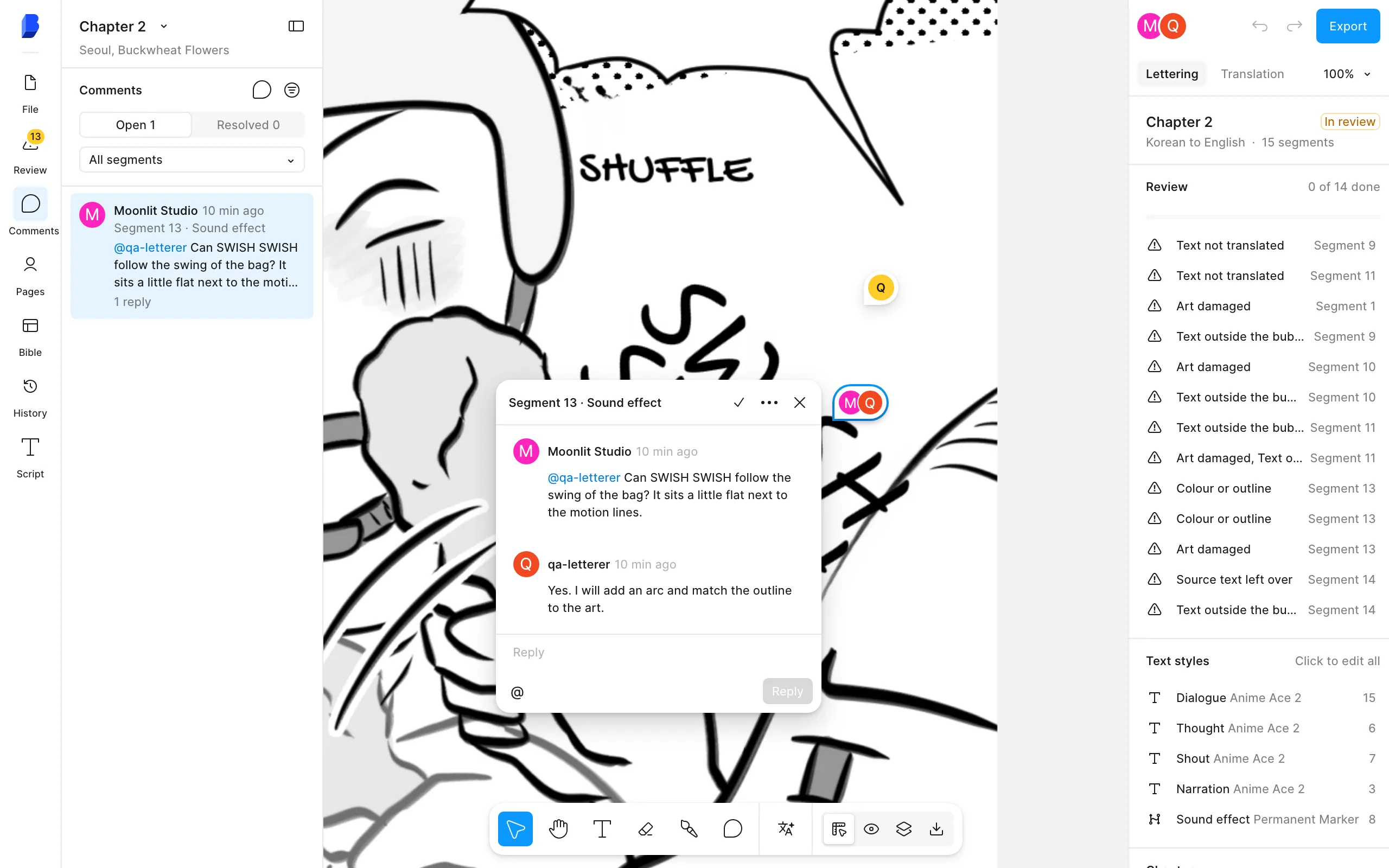
- Comment. Press C or pick the comment tool, then click a block or a spot on the page. Type @ to mention a teammate. Threads can be resolved, and the Comments tab lists them.
- Follow mentions. The bell in the library sidebar shows your unread mentions across every workspace. Click one to open the comment.
- Share one bible. Every member works from the same series bible, so names stay the same whoever translates the chapter.
How to fix a page is in edit a page. For translator workflows, see Bublate for translators.
Frequently asked questions
Why does the invite link say "This invite cannot open"?
An invite opens only for the email address it was sent to. Sign out, then sign in or sign up with that address and open the link again. The page offers Sign in with another address. If the address is wrong, the owner cancels the invite and sends a new one.
Can a member see my other workspaces?
No. A member sees only the workspace they joined. If you belong to more than one, click your name at the top of the sidebar and pick a workspace. Your own one is listed as Your workspace. The library, credits and series change with the workspace.
What happens to comments when I remove someone?
They lose access to the workspace at once, and their comments stay. You can invite them again later. A member can also leave a team by themselves from Settings, Team.
Do members need their own credits?
No. The owner pays for every chapter the team starts, from the owner's free and bought credits. Members see "The workspace owner buys credits." in place of the Buy credits button.